Download: https://github.com/boundless-beta/openfx-betafx/releases/
( Info: https://yellowtealpurple.net/forums/resources/betafx-ofx.20/ )

Installation steps:
1. Download zip and extract it
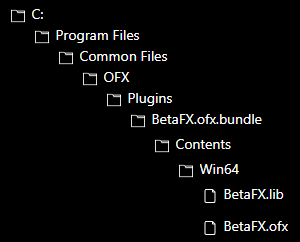
2. Drag "BetaFX.ofx.bundle" folder to "C:\Program Files\Common Files\OFX\Plugins"
(If you are confused, look at the folder structure picture)
3. Start/restart Vegas and it should show up as VideoFX

Q: Why does the plugin show a black screen?
A: Try turning off "GPU acceleration of video processing" in the "Video" tab of preferences
Note: I will see if there is another way to fix this later on.